# 《AI Agent 脚手架》第2-16节:fix-多模态能力使用
作者:小傅哥
博客:https://bugstack.cn (opens new window)
视频:https://t.zsxq.com/XqlKu (opens new window)
沉淀、分享、成长,让自己和他人都能有所收获!😄
# 一、本章诉求
为接入 Google ADK 的 Spring AI 提供图片识别的多模态能力。
这本应该是一个简单直接使用的功能,但在 Google ADK 0.5.0、Spring AI 1.1.0 版本上,它还是一个隐藏待处理的 Bug,小傅哥已于 2026年1月6日,提交 https://github.com/google/adk-java/issues/705 (opens new window)
Google ADK Java 开发工程师,在 2026年1月7日,处理提交了修复代码,应该会在后续版本更新。
不过,对于我们学习来说,这并不是坏事。我们可以借助这样的问题点,深入理解 Google ADK 和 Spring AI 的对接,以及学习如何排查这样的报错。最终,鉴于 Google ADK 版本更新周期,我们目前先在程序中打一个”补丁“实现。
# 二、发现问题
# 步骤1,功能诉求
@Test
public void test_handlerMessage_03() throws IOException {
    AiAgentRegisterVO aiAgentRegisterVO = applicationContext.getBean("100003", AiAgentRegisterVO.class);

   String appName = aiAgentRegisterVO.getAppName();
    InMemoryRunner runner = aiAgentRegisterVO.getRunner();
    Session session = runner.sessionService()
            .createSession(appName, "xiaofuge")
            .blockingGet();

    Content userMsg = Content.fromParts(Part.fromText("这是什么图片?"),
            Part.fromBytes(imageResource.getContentAsByteArray(), MimeTypeUtils.IMAGE_PNG_VALUE));

    Flowable<Event> events = runner.runAsync("xiaofuge", session.id(), userMsg);

    List<String> outputs = new ArrayList<>();
    events.blockingForEach(event -> outputs.add(event.stringifyContent()));
    log.info("测试结果:{}", JSON.toJSONString(outputs));
}
1
2
3
4
5
6
7
8
9
10
11
12
13
14
15
16
17
18
19
2
3
4
5
6
7
8
9
10
11
12
13
14
15
16
17
18
19
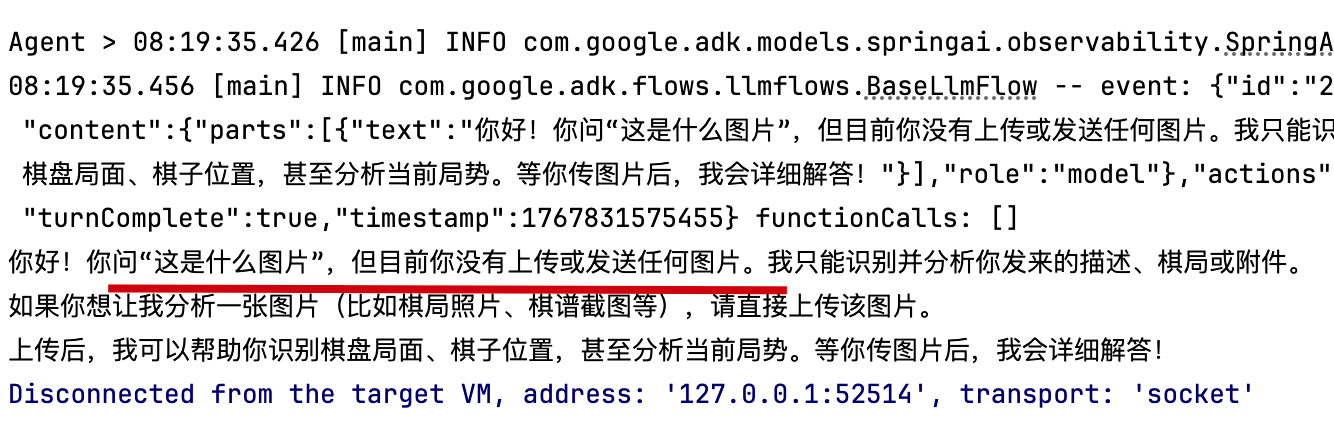
- 在新的章节,需要验证多模态能力的时候,传入了一个图片 byte,但无论如何修改运行,都只是提示无法识别图片。
- 这个时候猜想,是不是 InMemoryRunner 构建问题,或者 Agent 实例化参数问题。所以,决定把问题缩小,单独验证 Google ADK + Spring AI。
# 步骤2,分块验证
@Slf4j
public class SpringAiTest {

    @SneakyThrows
    public static void main(String[] args) {

        OpenAiApi openAiApi = OpenAiApi.builder()
                .baseUrl("https://apis.itedus.cn")
                .apiKey("sk-2GQTYTNoQSs7qizlE9F00bD84d254c2994D44d6410B0Ac8f")
                .completionsPath("v1/chat/completions")
                .embeddingsPath("v1/embeddings")
                .build();

        ChatModel chatModel = OpenAiChatModel.builder()
                .openAiApi(openAiApi)
                .defaultOptions(OpenAiChatOptions.builder()
                        .model("gpt-4.1")
                        .build())
                .build();

        LlmAgent agent = LlmAgent.builder()
                .name("test")
                .description("Chess coach agent")
                .model(new SpringAI(chatModel))
                .instruction("""
                        You are a knowledgeable chess coach
                        who helps chess players train and sharpen their chess skills.
                        """)
                .build();

        InMemoryRunner runner = new InMemoryRunner(agent);

        Session session = runner
                .sessionService()
                .createSession("test", "xiaofuge")
                .blockingGet();

        URL resource = Thread.currentThread().getContextClassLoader().getResource("dog.png");

        byte[] bytes;
        assert resource != null;
        try (InputStream inputStream = resource.openStream()) {
            bytes = inputStream.readAllBytes();
        }

        List<Part> parts = new ArrayList<>();
        parts.add(Part.fromText("这是什么图片"));
        parts.add(Part.fromBytes(bytes, MimeTypeUtils.IMAGE_PNG_VALUE));

        Content content = Content.builder().role("user").parts(parts).build();

        Flowable<Event> events = runner.runAsync("xiaofuge", session.id(),
                content
        );

        System.out.print("\nAgent > ");
        events.blockingForEach(event -> System.out.println(event.stringifyContent()));
    }

}
1
2
3
4
5
6
7
8
9
10
11
12
13
14
15
16
17
18
19
20
21
22
23
24
25
26
27
28
29
30
31
32
33
34
35
36
37
38
39
40
41
42
43
44
45
46
47
48
49
50
51
52
53
54
55
56
57
58
59
60
2
3
4
5
6
7
8
9
10
11
12
13
14
15
16
17
18
19
20
21
22
23
24
25
26
27
28
29
30
31
32
33
34
35
36
37
38
39
40
41
42
43
44
45
46
47
48
49
50
51
52
53
54
55
56
57
58
59
60
- 效果;运行结果依然是识别不了,告诉我要上传图片,它才能识别。
- 猜想;这说明单独按照官网案例构建 Agent 并测试依然不行,再细化验证。
京ICP备19031103号 | 
京公网安备 11030102010881号
| GPL Licensed | Copyright © 2019 小傅哥,All rights reserved.